Exams / Esami - INFN Roma
←
→
Trascrizione del contenuto della pagina
Se il tuo browser non visualizza correttamente la pagina, ti preghiamo di leggere il contenuto della pagina quaggiù

Exams / Esami
Due to the pandemic, the exams will be operated
in "telematic mode", i.e. via a network connection.
If we do it in a well organized way, we do not
expect large differences respect to the past.
Notice that we will return to the standard way as
soon as possible, i.e. when a safe and stable
possibility of in-presence contacts is possible.
The next pages contain some information for the
students.
A causa della pandemia in corso gli esami saranno
fatti in "modalità telematica", ovvero con una
connessione di rete. Se lo facciamo in modo
sistematico e organizzato, non ci saranno grandi
differenze rispetto al passato.
Si noti che torneremo al modo standard al più
presto, ovvero quando sarà possibile avere
contatti in presenza in modo sicuro.                  "My students still haven't connected!!"
Le    pagine    seguenti      contengono    alcune    "That's the microwave."
informazioni pratiche per gli studenti.
  AA 2019-2020 - Esami telematici                                                       1
Exams (en)
INSTRUCTIONS FOR (GRAPHIC) TABLETS
A tablet, or a graphic tablet connected to a    PLEASE CHECK THESE OPERATIONS AND
PC, is certainly the best way to present your   THE TRANSMISSION IN ADVANCE
writing during an oral exam.
                                                REMEMBER: A TECHNICAL FAILURE IS NOT
PLEASE USE IT ONLY IF YOU ARE REALLY            DISTINGUISHABLE  FROM     A     POOR
SURE TO MASTER THE TECHNIQUE                    UNDERSTANDING OF THE QUESTIONS AND
                                                CAUSES UNAVOIDABLY A BAD OUTCOME
On your tablet/PC open a program, chosen
                                                OF THE EXAM
by you, that allows to write on a window. If
you need a suggestion, use OpenBoard,           [as an alternate method, use the good old
available at no charge for Linux, Mac and       system of paper and pencil, as described in
Windows and quite user-friendly.                the next page...]
Connect your tablet/PC to the Meet address
sent to you (like https://meet.google.com/
xxx-xxxx-xxx) and share your window.
Also connect your smartphone to the Meet
address that has been sent to you and                     [traduzione italiana nelle prossime pagine]
frame yourself and your desk with its
camera.
   AA 2019-2020 - Esami telematici                                                              2
Exams – paper and pen (en)
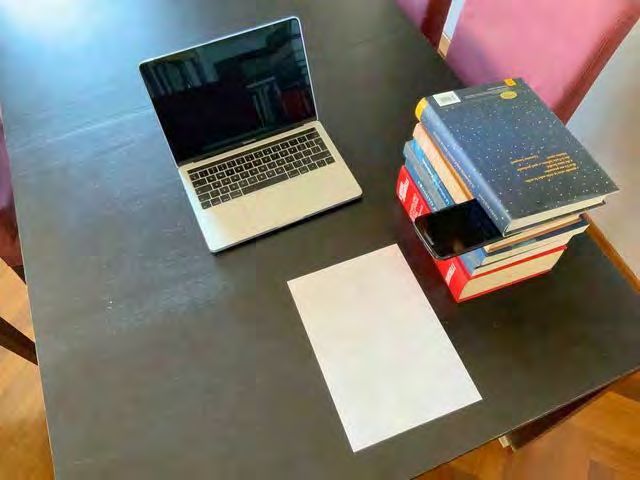
(LOOK TO THE PHOTOS ON THE NEXT PAGES) If the focus of the smartphone is not good,
slowly raise and lower the smartphone and put
On the left (right for left-handers) of the paper it back on the stack of books. Place a book on
sheets, make a pile of books of about 20-30 cm. top of the smartphone to lock it. In case give to
Connect your smartphone to the Meet address the phone a slight inclination (with a small
(like https://meet.google.com/xxx-xxxx-xxx) and thickness) to frame the sheet more extensively.
prepare it as follows. Connect also with a computer to the given Meet
On the Meet screen of the smartphone at the address. Use the computer camera to frame the
top right there are 3 dots and on the left a worktop.
speaker (if they do not appear touch the Please use a dark pen/pencil, e.g. a felt tip pen
screen). Touch the speaker and in the window ("pennarello"), and write with large characters. If
click: "Audio disattivato" (i.e. muted). the light is not sufficient, use a lamp.
Touch the three dots and in the window select:
"Change camera"; the main camera is now
active (not for selfies). Touch the Meet screen PLEASE CHECK THE TRANSMISSION AND THE
and change (cancel microphone). IMAGE QUALITY IN ADVANCE
Rotate your smartphone to take full advantage
of the screen (clockwise 90° for right-handed
people, counterclockwise 90° for left-handed
people). Place the smartphone on the stack of
books by framing the paper sheet. courtesy of F.Lacava
AA 2019-2020 - Esami telematici 3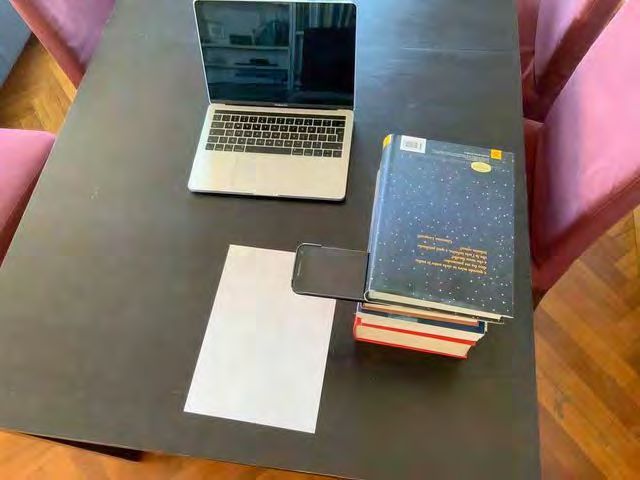
Esami (it)
ISTRUZIONI PER L'USO                DI   TABLET/   partecipanti alla riunione.
TAVOLETTA GRAFICA
                                                   Contemporaneamente con lo smartphone
Un ottimo metodo per l'esame è utilizzare          collegatevi all'indirizzo Meet che vi è stato
un "tablet" (computer con schermo                  inviato e con la telecamera inquadrate
scrivibile) oppure una tavoletta grafica           frontalmente voi e la vostra postazione.
connessa al PC.
                                                   FATE IN ANTICIPO UN TEST DELLE
UTILIZZATE QUESTO METODO SOLAMENTE                 OPERAZIONI E DELLA TRASMISSIONE
SE SIETE SICURI DI QUELLO CHE FATE
                                                   RICORDATE: LA COMMISSIONE NON PUÒ
Aprite sul vostro tablet/PC un programma a         DISTINGUERE TRA L'INCAPACITÀ AD
vostra scelta che vi consenta di scrivere su       UTILIZZARE LA TECNOLOGIA E LA
una finestra dello schermo. Se volete un           MANCANZA DI STUDIO.
suggerimento, usate OpenBoard, che può
                                                   [in alternativa, le prossime pagine
essere scaricato gratuitamente per Linux,
                                                   descrivono come fare l'esame con carta e
Mac e Windows ed è facile da usare.
                                                   penna...]
Connettete il vostro tablet/PC all'indirizzo
Meet che vi è stato inviato (del tipo
https://meet.google.com/xxx-xxxx-xxx)      e
condividete la finestra con gli altri

  AA 2019-2020 - Esami telematici                                                           4
Esami con carta e penna (it)
(GUARDATE LE FOTO ALLE PAGINE SEGUENTI) mancini). Posizionare lo smartphone sulla pila
di libri inquadrando il foglio sul quale si
Sulla sinistra (sulla destra per i mancini) del piano scriverà.
di scrittura fare una pila di libri di circa 20-30 cm.
Se la messa a fuoco dello smartphone non è
Connettersi con lo smartphone all'indirizzo Meet buona, alzare e abbassare lentamente lo
che vi è stato inviato (del tipo https://meet. smartphone, rimettendolo in posizione sulla
google.com/xxx-xxxx-xxx) e prepararlo come pila di libri. Posizionare un libro sullo
segue. smartphone per bloccarlo. In caso dargli una
Sullo schermo Meet dello smartphone in alto a leggera inclinazione (con un piccolo spessore)
destra ci sono 3 puntini e a sinistra un per inquadrare più estesamente il foglio.
altoparlante (se non compaiono, toccare lo Connettersi anche con il computer all'indirizzo
schermo). Toccare l'altoparlante e nella finestra Meet che avete ricevuto. Inquadrare con la
che si apre. Cliccare: "Audio disattivato". videocamera del computer il piano di lavoro
Toccare i tre puntini e nella finestra che si apre Siete pregati di usare un pennarello scuro e di
e selezionare "Cambia fotocamera"; ora è scrivere in caratteri larghi. In caso di scarsa
attiva la fotocamera principale (non per selfie). illuminazione, usate una lampada .
Toccare schermo meet e mutare (cancellare
microfono).
Ruotate lo smartphone in modo da sfruttare lo FATE IN ANTICIPO UN TEST DELLA
schermo al massimo (in senso orario di 90° per TRASMISSIONE E DELLA QUALITÀ DELLE
destrimani, in senso antiorario di 90° per IMMAGINI
AA 2019-2020 - Esami telematici 5Right-handed/Destrimani (1) AA 2019-2020 - Esami telematici 6
Right-handed/Destrimani (2)

AA 2019-2020 - Esami telematici                    7
Left-handed/Mancini (1)

AA 2019-2020 - Esami telematici                       8
Left-handed/Mancini (2)

AA 2019-2020 - Esami telematici                       9
Puoi anche leggere


